import json
import urllib.requestDemo
See the finished idea first
Success check
What should happen?
When the player reaches the high-score screen, a quote should appear at the top of the window and wrap neatly across multiple lines if it is too long.
Tasks
Work through the challenge
Tick each step off as you complete it. Your progress is saved on this device.
0/13 complete
Start with the API helper module.
def load_data(url):response = urllib.request.urlopen(url)return json.loads(response.read())def get_quote():
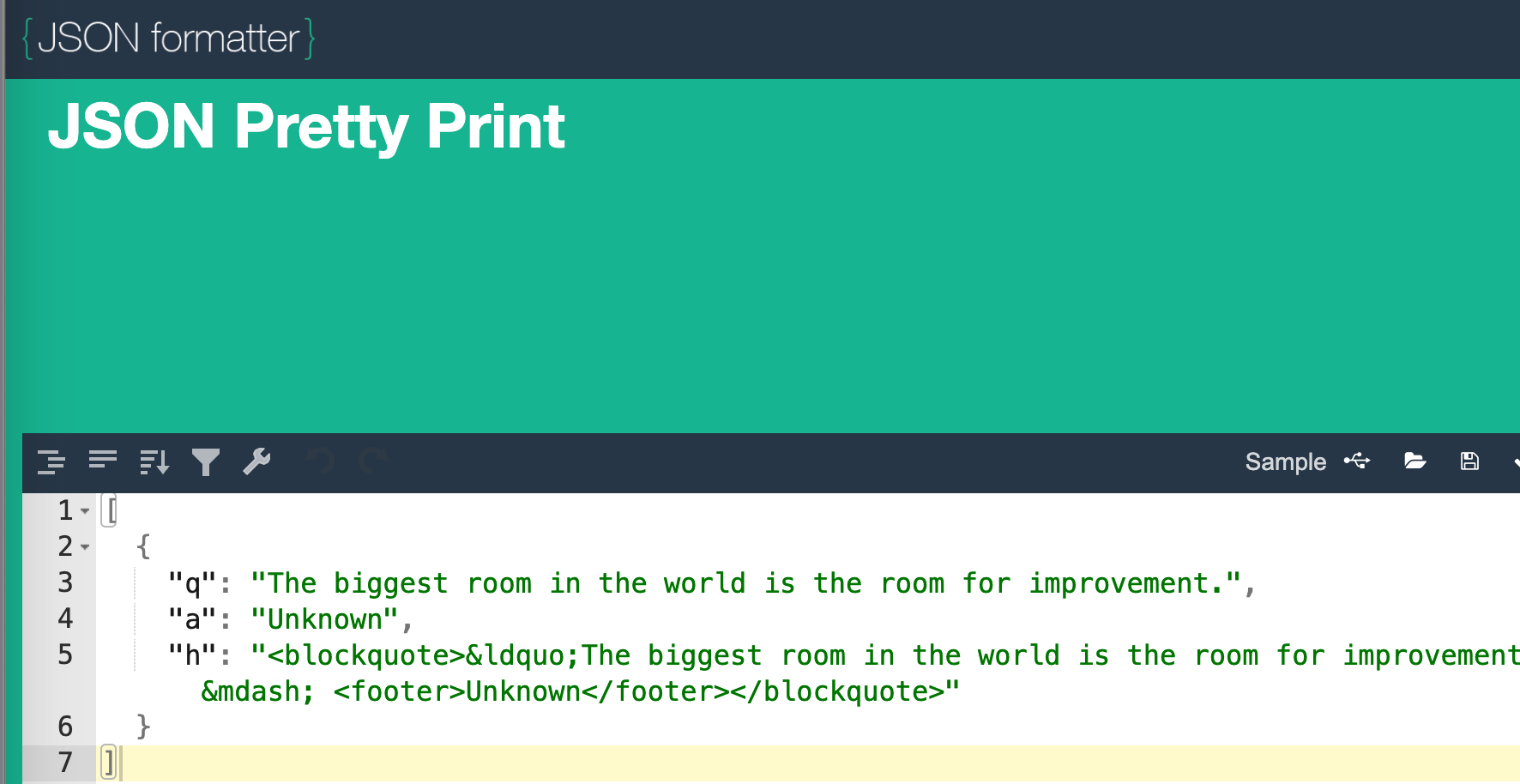
quote = load_data("https://zenquotes.io/api/random")[0]Open jsonformatter.org and compare the response structure with the example below.
JSON guide
- The API returns a list containing one dictionary.
[0]gets the first dictionary from the list.quote['q']gets the quote text.quote['a']gets the author.
[
{
"q": "It's necessary to get the losers out of your life if you want to live your dream.",
"a": "Les Brown",
"h": "<blockquote>“It's necessary to get the losers out of your life if you want to live your dream.” — <footer>Les Brown</footer></blockquote>"
}
]“It's necessary to get the losers out of your life if you want to live your dream.” - Les Brown
return f"{quote['q']} - {quote['a']}"import my_api as madef show_quote(quote):
'''Your code goes here'''def show_quote(quote):
words = quote.split(' ')
max_width = SIZE[0] - 100
x = 50
y = 20
while words:
line = ''
while words and FONT.size(line + words[0])[0] <= max_width:
line += (words.pop(0) + ' ')
line_label = FONT.render(line, True, WHITE)
SCREEN.blit(line_label, (x, y))
y += FONT.get_height()# Quotes
QUOTE = ma.get_quote()elif game_state == SHOW_HIGH_SCORES:
show_quote(QUOTE)
show_high_scores()Live IDE
Code the project in the browser
The editor below starts with all five supplied Python files preloaded. Use the IDE’s Reset Code button to restore the original project at any time.
The supplied zip has already been loaded so learners can edit the real multi-file project immediately instead of copying everything in by hand.
main.pycontains the game loop and high-score screen.my_api.pyis where the API helper functions live.my_queue.py,my_stack.py, andbinary_tree.pysupport the game logic.