The internet
- The internet is a worldwide collection of interconnected networks, not the same thing as the World Wide Web.
- DNS translates human-friendly web addresses into IP addresses so browsers can reach the correct server.
- Web hosting, web servers, clients and cloud services all work together to make online services available anywhere.
Quick Reference
Use the lesson visuals and recap notes before you begin the activities.

The internet
- A global collection of interconnected networks.
- The World Wide Web is only one service that runs on it.
- Routers and backbone links move data between distant networks.
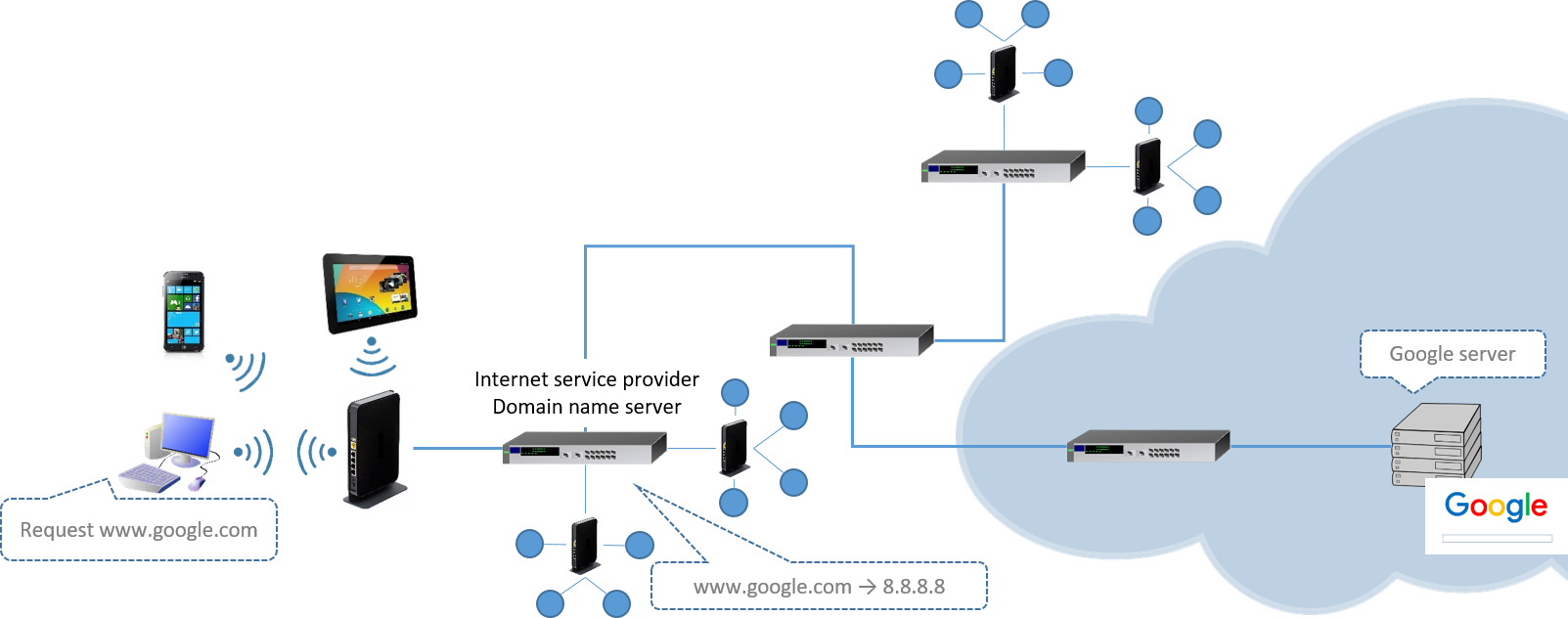
Domain Name Service (DNS)
- Converts a URL such as
www.google.cominto an IP address. - Lets users remember names instead of long numbers.
- Without DNS, the browser would not know where to send its request.

Hosting
- Websites are stored on dedicated servers connected to the internet.
- Hosted services aim to be reliable, secure and available 24/7.
- They need stable IP addresses and support for many users at once.

Web servers and clients
- A client requests a service, usually through a browser or app.
- A web server stores website files and responds to client requests.
- The browser renders the returned HTML, CSS and JavaScript into a web page.
Client devices
- Clients can be desktops, laptops, tablets or phones.
- They use services provided by servers.
- The user interacts with the client, which sends the request onward.

The cloud
- Data and programs are stored on remote servers and accessed over the internet.
- Benefits include access anywhere, large storage, backup and collaboration.
- Drawbacks include less control, ongoing cost and dependence on internet access.
Activity 1: Match each fact card
Drag each statement into the correct internet concept box.
0 / 12 correct
Statement cards
Activity 2: Sequence a web request
Choose the correct step number for each part of the web page request journey.
0 / 6 correct
Activity 3: Choose the best term
Read each situation and decide which internet concept is the best fit.
0 / 6 correct
Activity 4: Retrieval quiz and explain
Answer the recap questions, then explain how DNS and a web server help a browser load a page.
0 / 4 correct
1. What does DNS mainly do?
2. Which device is acting as the client when a student opens a website on a laptop?
3. Why is hosting used for websites?
4. Which cloud advantage is correct?
Download PDF
Download a PDF of student responses, scores and model answers.